



At the moment, important developments are taking place around ThreeFold’s decentralized internet. Recently, Project Mycelium was launched.
Mycelium forms the new technical foundation of the network and is designed to enable a global digital ecosystem in which people and organizations remain owners of their own data and infrastructure. The goal is to build a sovereign digital world where internet services are not dependent on central cloud providers.
This development also affects node owners who are already contributing to the current ThreeFold network.
The network on which most nodes run today is called the V3 network. In this network, node owners receive rewards for providing capacity such as storage, computing power, and memory.
With the arrival of the new Mycelium network (V4), this model changes. Nodes will no longer be rewarded for simply making capacity available, but for the actual use of that capacity by applications and services on the network.
The current reward model of the V3 network has ended. To continue receiving rewards, you therefore need to register your node(s) on the new Mycelium network.
That may sound like a big technical step, but in practice it’s only an administrative change that takes just a few minutes.
In this article, we’ll explain step by step how to do this.
Make sure to complete this before March 31.
For node owners, an important deadline has been set: March 31.
If you want to continue receiving rewards for your node, you must register it on the new Mycelium network before this date.
The good news: this is not a technical migration of your node. It’s simply an administrative step that usually takes just a few minutes.
In the next steps, we’ll show you exactly how to do it.
Before you start
To register your node on the Mycelium network, you’ll need access to the wallet linked to your farm.
You can use one of the following two options:
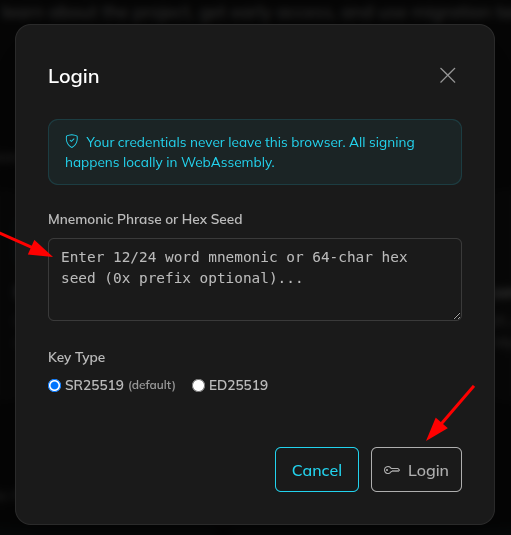
- Mnemonic Phrase: the sequence of 24 words you saved when you created your wallet.
- HexSeed: note that in some instructions this term is used. In the ThreeFold Connect app, this key is called TFChain Secret. It’s the same key..
This ensures you can correctly connect your node to the new Mycelium network.
Where to Find the HexSeed / TFChain Secret
You can find the HexSeed (or TFChain Secret) in the ThreeFold Connect app. Follow these steps:
- Open the ThreeFold Connect app
- Go to Farming
- Select the V3 tab
- Click on the farm where your node(s) are listed
- You will now enter the farm details screen
In this screen, you will see the TFChain Secret — this is the same as the HexSeed.
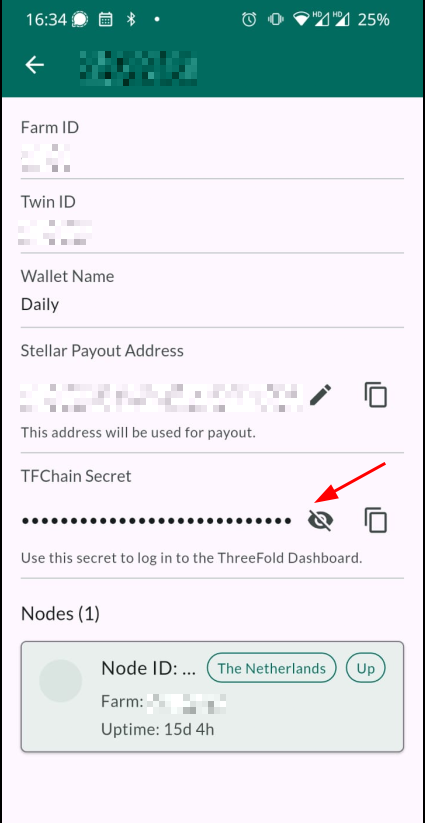
By clicking the eye icon next to TFChain Secret, you can make the key visible. After that, you can copy it and use it to log in to the migration portal.
Use this TFChain Secret when logging in at:
Here’s how to register your node on the Mycelium network:
When you have the correct wallet details ready, you can register your node on the new network.
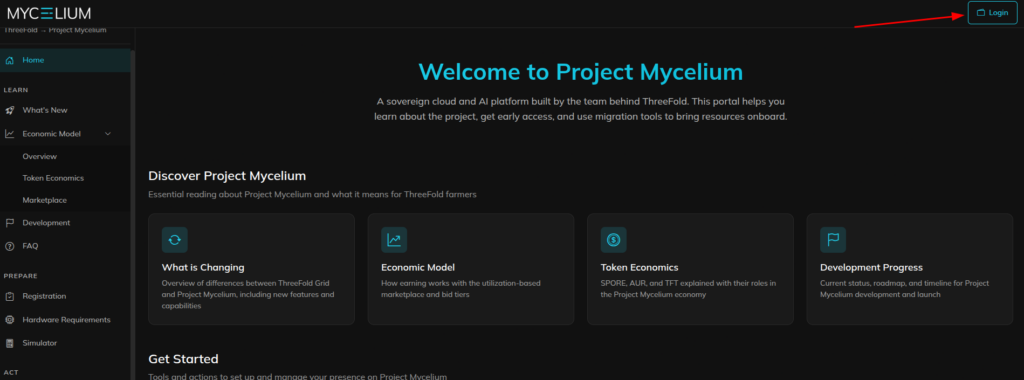
Step 1 – Log in to the migration portal
- Go to: https://migrate.projectmycelium.com
- Click on Login and log in with your Mnemonic Phrase or TFChain Secret (HexSeed).
Step 2 – Register your Mycelium Ledger account
- Click on Register.
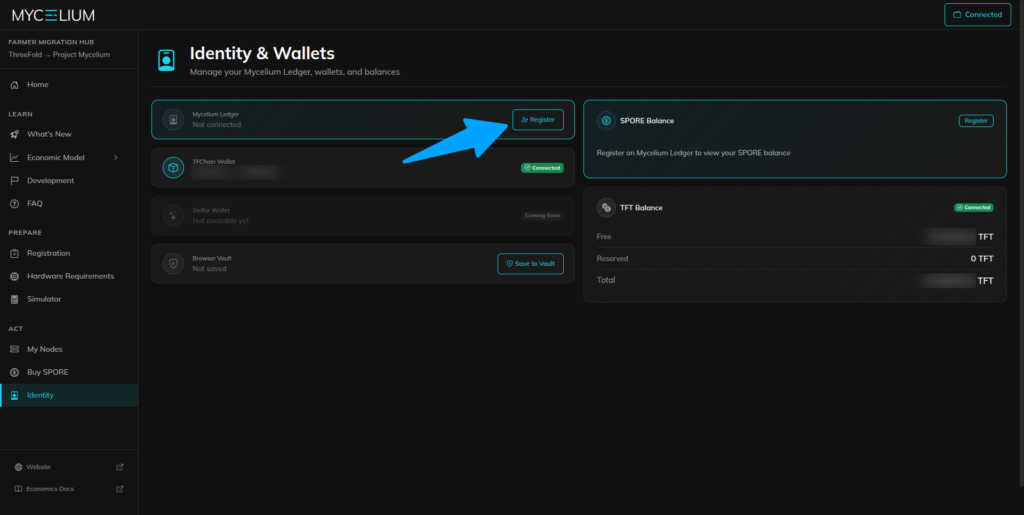
Fill in the following details:
- Your email address
- Your Mycelium name
Important: In both the firstname and lastname fields you must enter exactly 8 characters, consisting only of lowercase letters and numbers.
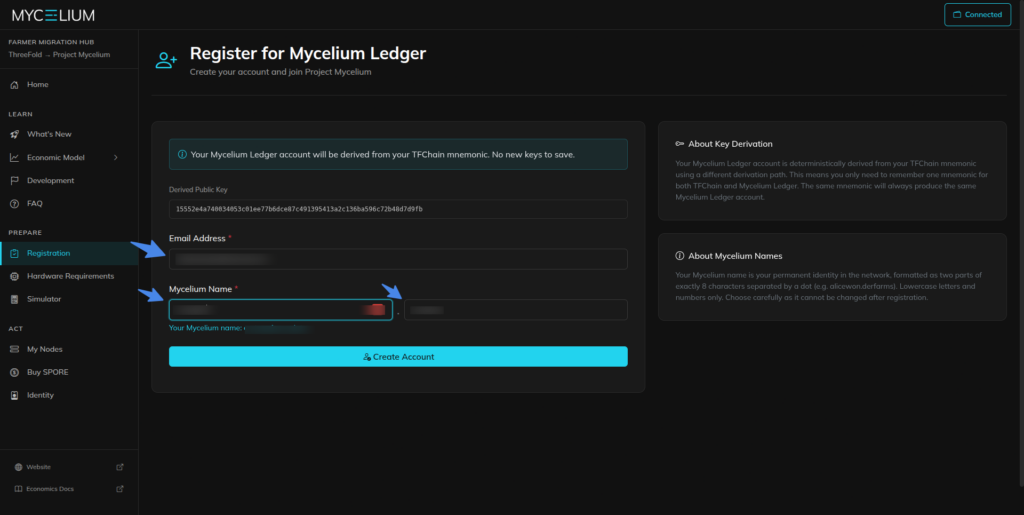
- Click on Create Account.
You will then receive an email from activation@projectmycelium.com to confirm your account.
- Click on the link in this email to activate your account.
Step 3 – Link your node to the Mycelium network
- Go to the portal and click on My Nodes.
Here you can see your existing node or nodes.
- Click on Move to Mycelium for the node you want to register.
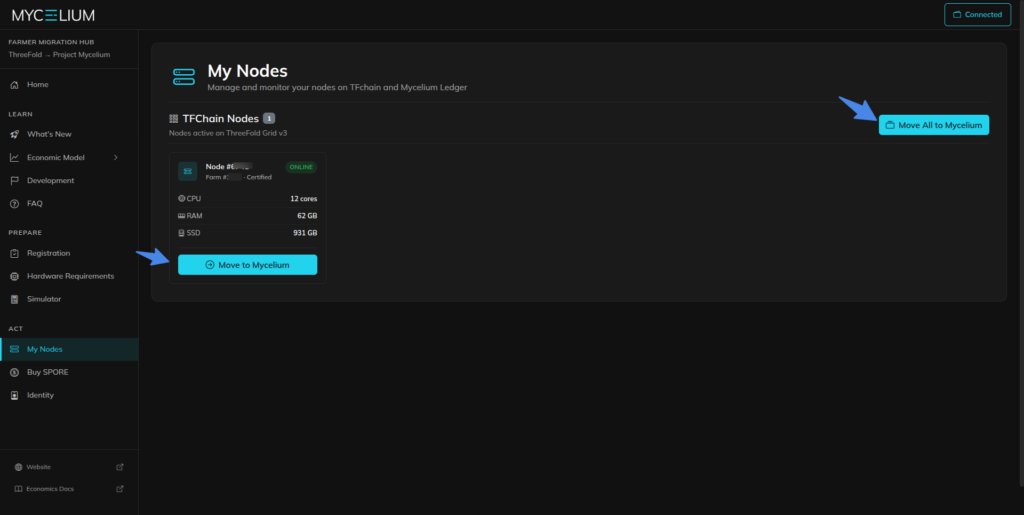
You will then see a screen with an explanation of the change and the Terms & Conditions.
- Read through these and then click Confirm.
After this step, your node is registered on the Mycelium network.
Optional: Exchange TFT for SPORE
After your node(s) are registered on the Mycelium network, you can optionally choose to exchange your TFT tokens for SPORE tokens.
SPORE is the token associated with the new Mycelium ecosystem.
This is not mandatory and is separate from registering your node. You can decide to do it later—or not at all.
Important to know
This registration is only an administrative step. Your node will thereby be linked to the new Mycelium network.
You don’t need to reinstall your node, and nothing changes in how your node is currently running.
The whole process usually only takes a few minutes.
Official information and help with questions
Would you like to read more about the background of this migration and the development of the Mycelium network? Then you can turn to the official sources of ThreeFold and Project Mycelium.
More information can be found here:
- ThreeFold forum (official announcement and explanation about the migration)
https://forum.threefold.io/t/migrate-your-nodes-by-march-31-earn-retroactive-spore-rewards-from-january-1/4714 - Mycelium migration portal
https://migrate.projectmycelium.com/ - Website of Project Mycelium
https://www.projectmycelium.com/
Do you have questions or run into issues while registering your node? Then it is best to first contact the ThreeFold team via the chat in the ThreeFold dashboard via: https://dashboard.grid.tf/#/
The team usually responds quickly and is known for their helpful support.
Stay up to date
The development of the decentralized internet and the Mycelium network is moving fast. YourData Network keeps you informed of all relevant developments, updates, and new opportunities.
We do this via our newsletter.
Do you want to stay informed? Then sign up via the registration form at the bottom right of this page.